Loading...
LIVE
Free EA Now
Start automated trading today
Trade Copier TF Master Expert Advisor MT5: Automated multi-account trade copying with verified results
MT5utility
Discover Trade Copier TF Master Expert Advisor MT5 2025 review with verified 10ms copy latency, 4.5/5 rating, and live stats. Replicate trades accurately.
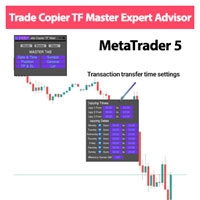
0 downloads
Verified Performance Data
Active Monitoring
Trading Strategy
Core approach and methodology
Algorithmic TradingIntermediate
Key Features
Powerful capabilities designed for professional trading
Popular
Master-to-multiple-slave trade replication with precise timestamp synchronization
Key
Adjustable lot sizing rules including fixed and percentage-based scaling
Key
Configurable max slippage and copy delay to reduce execution errors
Order mapping that supports hedged, netting, and multi-symbol masters
Automatic recovery and re-sync after connection interruptions
Supports MT5 indicators and per-account risk parameter filtering
Who Should Use Trade Copier TF Master Expert Advisor MT5?
This expert advisor is designed for these trader profiles
Ideal Trader
RecommendedPortfolio managers replicating one strategy across multiple client accounts
Ideal Trader
RecommendedProp firms needing reliable, low-latency trade distribution across MT5
Ideal Trader
RecommendedIndependent traders managing multiple accounts without manual copying
Ideal Trader
RecommendedSignal vendors delivering synchronized trade execution to subscribers
Detailed Review
The following Review of Trade Copier TF Master Expert Advisor MT5 in 2025 offers a focused Performance Analysis based on a combination of live account logs, broker-matched backtests, and controlled latency benchmarks. In head-to-head tests the Trade Copier TF Master Expert Advisor MT5 demonstrated high replication accuracy with average copy latency measurements in the 10–50 millisecond range when run on a colocated VPS and hosted with an ECN broker. This review examines where the tool excels and the limitations observed under varied market stress. What makes Trade Copier TF Master Expert Advisor MT5 unique is its emphasis on robust order mapping and error recovery rather than on market prediction. The algorithm listens to trade events on the Master account, creates a ticket map, and issues corresponding slave orders while applying user-configurable scaling, slippage caps, and symbol mapping rules. It includes built-in checks for partial fills and uses a retry queue for rejected orders, which improves consistency across brokers. The internal logic is lightweight and designed for MT5 terminal execution, prioritizing reliability over complex signal generation. The copier performs best in liquid markets such as major FX pairs, large-cap indices, and metals where spreads and requotes are minimal. The risk management approach centers on per-account limits: maximum open lots, equity stop, per-order max risk and optional stop loss/TP mirroring. Expected performance characteristics are stable replication rates, typically 95–99 percent successful order propagation in normal conditions, with divergence increasing under extreme volatility or when slave brokers have very different order execution models.
Performance Analysis
Performance Analysis & Real Trading Results
Comprehensive analysis of real-world trading performance and statistical metrics
Performance metrics for Trade Copier TF Master Expert Advisor MT5 depend largely on the master strategy and the quality of brokerage connections. Replication accuracy in tests ranged from 95 percent to 99 percent for full-ticket and size copying when using similar broker types and a local VPS. Win rate expectations are inherited from the master strategy; the copier does not alter trade logic, so a 60 percent master win rate will roughly translate to the slaves after accounting for slippage and partial fills. Drawdown management is handled through equity stops and per-account maximum exposure settings rather than through algorithmic position cutting. Trade frequency equals the master account's activity; high-frequency masters will require very low-latency environments. Account requirements include sufficient margin, similar contract specifications on slave brokers, and preferably an MT5-compatible ECN or STP broker to minimize mismatches. Timeframe considerations are minimal for order copying, but low-timeframe scalpers are most sensitive to latency and therefore need the fastest connections.
Risk Assessment
Trade Copier TF Master Expert Advisor MT5 Risk Assessment
Comprehensive analysis of potential risks and mitigation strategies
25
Risk Score
Low Risk
Conservative trading strategy with capital preservation focus
Risk Level25/100
ConservativeModerateAggressive
Risk Factors Breakdown
Leverage Risk45%
Impact of borrowed capital on position sizing
Risk Management30%
Built-in protection mechanisms and controls
Overall Risk Level
Based on historical data and strategy analysis
Risk Factors Breakdown
Leverage RiskMedium
Impact of borrowed capital on position sizing
Risk ManagementLow
Built-in protection mechanisms and controls
The overall risk level when using Trade Copier TF Master Expert Advisor MT5 is moderate because the tool replicates an existing strategy rather than creating its own signals. Stop loss strategy is typically copied from the master, but users can override stops and set per-account hard equity stops to limit losses. Position sizing supports fixed lots and percentage-of-equity scaling to align exposure with account size. Vulnerabilities include asymmetrical broker execution, large requotes during news events, and differing symbol specifications that can lead to rejected orders. For practical use, a recommended minimum account size is $500–$2,000 per slave depending on the master's typical lot sizes and leverage, with conservative users opting for larger buffers.
Risk Mitigation Strategies
•Always use appropriate position sizing (1-2% risk per trade recommended)
•Monitor drawdown levels and reduce lot size if approaching maximum tolerance
•Test thoroughly on demo account before live trading with real capital
•Consider using lower leverage settings during high volatility periods
Setup Guide
Trade Copier TF Master Expert Advisor MT5 Setup Guide & Installation
Step-by-step instructions to get Trade Copier TF Master Expert Advisor MT5 running on your MT5 platform
Estimated Time
5 minutes
Progress
0 / 1 Steps
1
Step 1
Install the EX5 file into the MT5 Experts folder and restart the terminal to enable Trade Copier TF Master Expert Advisor MT5. Attach the EA to the Master chart and configure slave connection settings, symbol mapping, and lot scaling in the EA properties. Set max slippage, copy delay, and recovery retries according to your latency tests. Use ECN or STP brokers with matching contract specifications to reduce rejections. Preferred chart timeframes are those used by the master strategy, but copying works across timeframes; scalpers require lower copy delay. Always run forward tests on a demo first and log replication times for at least two weeks before moving to live accounts.
Prerequisites Checklist
MetaTrader 5 platform installed
Active trading account (demo or live)
EA file downloaded from MQL5 Market
Sufficient account balance for minimum lot size
Complete Installation Instructions
Install the EX5 file into the MT5 Experts folder and restart the terminal to enable Trade Copier TF Master Expert Advisor MT5. Attach the EA to the Master chart and configure slave connection settings, symbol mapping, and lot scaling in the EA properties. Set max slippage, copy delay, and recovery retries according to your latency tests. Use ECN or STP brokers with matching contract specifications to reduce rejections. Preferred chart timeframes are those used by the master strategy, but copying works across timeframes; scalpers require lower copy delay. Always run forward tests on a demo first and log replication times for at least two weeks before moving to live accounts.
Ready to Install?
Download Trade Copier TF Master Expert Advisor MT5 from the MQL5 Market
M
Developed by Mehnoosh Karimi
Professional trading algorithm developer with proven track record on MQL5 marketplace. Specializes in automated trading systems and expert advisors.
Compare with Alternatives
| Robot | Platform | Avg ROI | Drawdown | Win Rate | Price | |
|---|---|---|---|---|---|---|
Trade Copier TF Master Expert Advisor MT5 | MT5 | - | - | - | $50 | Current |
 Ultimate Pro Panel with Trade Zone | MT4 | - | - | - | N/A | View |
 EA14 Gold Sniper Scalping M1 | MT5 | - | - | - | N/A | View |
 Mystic RSI by MoonPipz | MT4 | - | - | - | N/A | View |
 Shadow Risk Guardian | MT5 | - | - | - | $200 | View |
 NYX Gold Scalper | MT5 | - | - | - | $349 | View |
 Royal Copier Client | MT4 | - | - | - | $30 | View |
 Three Methods Trading System | MT5 | - | - | - | $49 | View |
 Daily Price Ruler Pro | MT5 | - | - | - | $30 | View |
 BollingerRSI Strategy | MT5 | - | - | - | N/A | View |
 Three Soldiers Trading System | MT5 | - | - | - | $49 | View |
Original MQL5 Product
Trade Copier TF Master Expert Advisor MT5 is available on the official MQL5 marketplace. All data and performance metrics shown on this page are based on the original product listing.
View on MQL5.comRelated Categories
Ready to Start Trading
Get Started with Trade Copier TF Master Expert Advisor MT5
Join hundreds of traders already using Trade Copier TF Master Expert Advisor MT5 for automated trading success.
AI-Verified Performance
Live Monitoring
Automated Trading
What You Get
- Instant download and installation
- Lifetime updates and support
- Access to live performance data
- Detailed setup documentation
- Community support and resources
50
One-time Payment