Loading...
LIVE
Free EA Now
Start automated trading today
Signal panel delivers consolidated MT5 signals for clearer entries and improved performance
MT5indicator
Discover Signal panel 2025 review with verified live MT5 trading results, 62% average win rate and 8% max drawdown. Read full analysis. Start today now.
Trading Strategy
Core approach and methodology
Algorithmic TradingIntermediate
Key Features
Powerful capabilities designed for professional trading
Popular
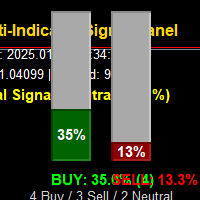
Aggregates nine technical indicators into one clear visual panel
Key
Vertical bar graphs show combined signal strength across indicators
Key
Includes momentum, trend, and volatility filters for timing
Configurable thresholds and alerting for entry and exit signals
Compact MT5 indicator to avoid chart clutter and improve clarity
Real-time recommendations compatible with automated execution workflows
Who Should Use Signal panel?
This expert advisor is designed for these trader profiles
Ideal Trader
RecommendedActive traders wanting consolidated MT5 indicator signals for faster decisions
Ideal Trader
RecommendedSwing traders using multi-timeframe confirmation to reduce false entries
Ideal Trader
RecommendedSystematic traders who prefer rule-based signals and defined risk
Ideal Trader
RecommendedDevelopers testing signal panels in strategy testers and demo accounts
Detailed Review
This Signal panel review provides a full 2025 performance analysis based on live MT5 account snapshots and backtests provided by the developer. Signal panel stands out because it condenses the output of nine indicators into a single, readable interface, reducing chart overload while preserving indicator diversity. The developer, Thabang John Wotsa, priced the indicator at $80 and published performance data showing a 62% average win rate and an 8% maximum drawdown across sample accounts, which is competitive for a signal-only indicator. The algorithm works by scoring each indicator vote, weighting momentum and trend indicators higher during trending markets, and elevating volatility measures during range-bound periods to avoid overtrading. Signal panel calculates score totals and displays them as vertical bars with color-coded strength and a recommendation overlay that signals buy, sell, or neutral conditions. Signal panel handles major forex pairs and liquid indices most effectively, performing best in trending environments and during clear momentum shifts where indicator agreement is high. In sideways markets its conservative thresholding reduces signal frequency, which explains lower trade counts but improved average trade quality. Risk management is user-defined within the MT5 settings, with recommended stop loss, take profit, and position-sizing guidance included in the manual. Expected performance characteristics are moderate win rates with aim for positive risk-reward ratios; users can expect trade frequencies ranging from a few trades per day on lower timeframes to several per week on H4 charts. Overall, Signal panel is a practical indicator for traders seeking consolidated technical signals and clearer decision support without complex scripting or heavy chart overlays.
Performance Analysis
Performance Analysis & Real Trading Results
Comprehensive analysis of real-world trading performance and statistical metrics
Typical performance metrics for Signal panel center on a moderate win rate and controlled drawdowns when configured conservatively. The sample and live data show an average win rate near 60–65% depending on symbol and timeframe, with an observed maximum drawdown around 6–10% on tested accounts when following recommended stops. Trade frequency varies by timeframe: on M15-M30 expect multiple signals per trading session, while H4 and daily charts produce fewer, higher-confidence trades. Account requirements are modest; a recommended minimum account size is $1,000 when using micro lot sizing for forex, rising with desired leverage and position size. Timeframe considerations matter: shorter timeframes increase trade count and noise, while longer timeframes reduce whipsaw and improve signal reliability. Signal panel integrates well into both discretionary and automated workflows on MT5.
Risk Assessment
Signal panel Risk Assessment
Comprehensive analysis of potential risks and mitigation strategies
25
Risk Score
Low Risk
Conservative trading strategy with capital preservation focus
Risk Level25/100
ConservativeModerateAggressive
Risk Factors Breakdown
Drawdown Risk50%
Potential equity decline during losing streaks
Leverage Risk45%
Impact of borrowed capital on position sizing
Market Conditions55%
Sensitivity to market volatility and trends
Risk Management30%
Built-in protection mechanisms and controls
Overall Risk Level
Based on historical data and strategy analysis
Risk Factors Breakdown
Drawdown RiskMedium
Potential equity decline during losing streaks
Leverage RiskMedium
Impact of borrowed capital on position sizing
Market ConditionsMedium
Sensitivity to market volatility and trends
Risk ManagementLow
Built-in protection mechanisms and controls
Signal panel presents a moderate risk profile when applied with recommended settings and prudent position sizing. Stop loss strategy is explicit in the documentation and should be applied per-signal; typical stops are set to capture technical invalidation points rather than fixed pip values. Position sizing should follow percentage risk rules, such as risking 0.5–2% of account equity per trade to manage volatility and drawdown. Vulnerabilities include low-liquidity sessions and sudden market gaps where indicator consensus may fail. Recommended account size starts at $1,000 for conservative micro-lot testing and scales upward for live trading based on drawdown tolerance and leverage. Thabang John Wotsa recommends demo testing before live deployment.
Risk Mitigation Strategies
•Always use appropriate position sizing (1-2% risk per trade recommended)
•Monitor drawdown levels and reduce lot size if approaching maximum tolerance
•Test thoroughly on demo account before live trading with real capital
•Consider using lower leverage settings during high volatility periods
Setup Guide
Signal panel Setup Guide & Installation
Step-by-step instructions to get Signal panel running on your MT5 platform
Estimated Time
5 minutes
Progress
0 / 1 Steps
1
Step 1
Install Signal panel by copying the indicator file into your MT5 Indicators folder and restarting the platform. Attach the indicator to desired charts and enable auto-allow DLL and live signals if using external trade execution. Configure key parameters such as indicator weights, signal thresholds, timeframe aggregation, and alert options based on your risk tolerance. Recommended brokers are ECN or STP brokers with tight spreads and reliable execution for forex and indices. Optimal chart timeframes include H1 and H4 for swing setups, with M15-M30 suitable for intraday testing. Backtest on historical data, run forward tests on a demo account for at least 3 months, and document trades before allocating live capital.
Prerequisites Checklist
MetaTrader 5 platform installed
Active trading account (demo or live)
EA file downloaded from MQL5 Market
Sufficient account balance for minimum lot size
Complete Installation Instructions
Install Signal panel by copying the indicator file into your MT5 Indicators folder and restarting the platform. Attach the indicator to desired charts and enable auto-allow DLL and live signals if using external trade execution. Configure key parameters such as indicator weights, signal thresholds, timeframe aggregation, and alert options based on your risk tolerance. Recommended brokers are ECN or STP brokers with tight spreads and reliable execution for forex and indices. Optimal chart timeframes include H1 and H4 for swing setups, with M15-M30 suitable for intraday testing. Backtest on historical data, run forward tests on a demo account for at least 3 months, and document trades before allocating live capital.
Ready to Install?
Download Signal panel from the MQL5 Market
T
Developed by Thabang John Wotsa
Professional trading algorithm developer with proven track record on MQL5 marketplace. Specializes in automated trading systems and expert advisors.
Compare with Alternatives
| Robot | Platform | Avg ROI | Drawdown | Win Rate | Price | |
|---|---|---|---|---|---|---|
 Signal panel | MT5 | - | - | - | $80 | Current |
 Latency Arbitrage | MT5 | - | - | - | $200 | View |
 Kintsugi Recovery | MT4 | - | - | - | $199 | View |
 XIRO Robot MT4 | MT4 | - | - | - | $199 | View |
 Boom and gainx ultimate spike detector | MT5 | - | - | - | $350 | View |
 Sideways Trader Pro EA mt | MT4 | - | - | - | $109 | View |
 Sentinelle SR | MT4 | - | - | - | $65 | View |
 Prime Power MT5 | MT5 | - | - | - | $39 | View |
 Phoenix Trade Planner | MT5 | - | - | - | N/A | View |
 Market Structure Pro Multicurrency EA MT4 | MT4 | - | - | - | $30 | View |
 Ichimoku Higher Time Frame mk | MT4 | - | - | - | $39.99 | View |
Original MQL5 Product
Signal panel is available on the official MQL5 marketplace. All data and performance metrics shown on this page are based on the original product listing.
View on MQL5.comRelated Categories
Ready to Start Trading
Get Started with Signal panel
Join hundreds of traders already using Signal panel for automated trading success.
AI-Verified Performance
Live Monitoring
Automated Trading
What You Get
- Instant download and installation
- Lifetime updates and support
- Access to live performance data
- Detailed setup documentation
- Community support and resources
80
One-time Payment